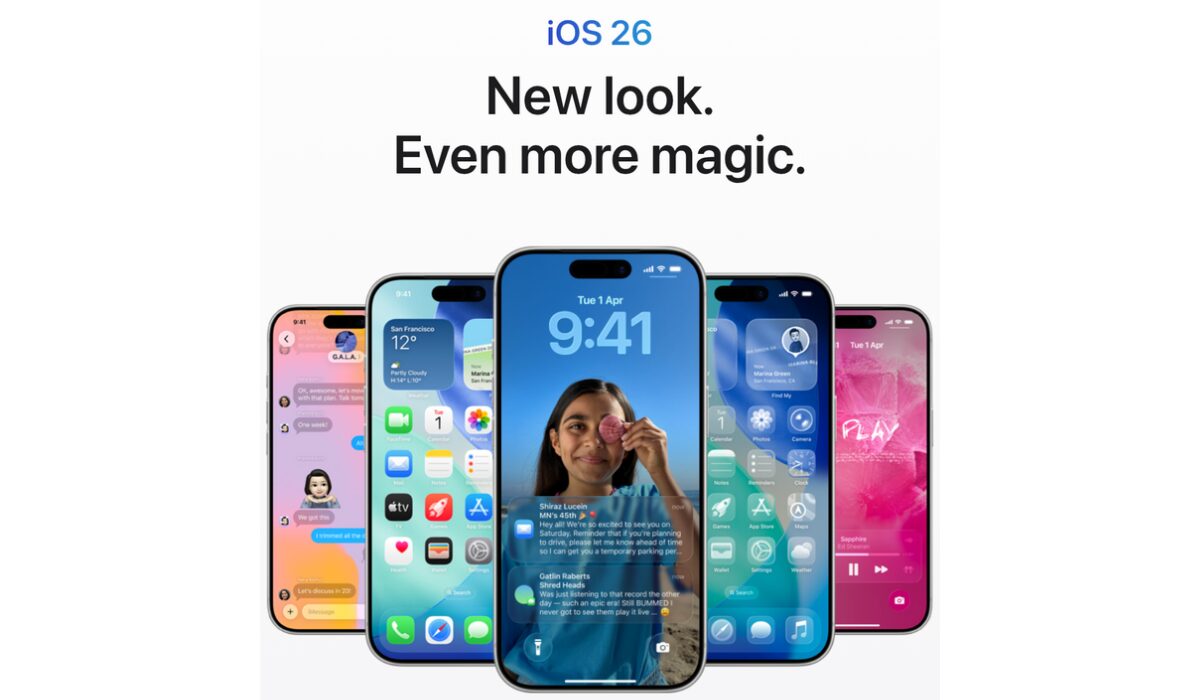
Apple has officially released iOS 26 for iPhone users worldwide on September 15, after months of anticipation. This latest update brings a stunning new Liquid Glass design, powerful Apple Intelligence integration, and several practical tools that improve communication, performance, and everyday usability.
Key Features of iOS 26
1. Liquid Glass Design
The most striking highlight of iOS 26 is its all-new visual experience. Called Liquid Glass, this design makes the iPhone’s user interface more transparent, elegant, and fluid. Users will notice refreshed looks across the lock screen, home screen, and control center, offering a modern and immersive experience.
2. Enhanced Apple Intelligence
Apple’s next-generation AI features are deeply integrated into iOS 26, delivering smarter and more intuitive functionality. Key improvements include:
Live Translation: Instantly translate messages, FaceTime conversations, and phone calls in real time.
Visual Intelligence: Ask questions about on-screen content and get relevant insights instantly.
3. New Communication Tools
iOS 26 makes calling and messaging more efficient and customizable:
Call Screening: Automatically screens unknown numbers and provides caller identification.
Messages Upgrades: Create polls in group chats and set unique backgrounds for each conversation.
4. Additional Useful Features
AutoMix in Apple Music: Enjoy faster, seamless transitions and playlists.
Preview App on iPhone: Now available for editing photos and videos directly on your device.
iOS 26 Compatibility
iOS 26 is available for iPhone 11 and newer models. The iPhone 16 series, iPhone 15 Pro, and iPhone 15 Pro Max fully support Apple Intelligence features, offering the most complete experience.
How to Prepare for the Update
Before installing iOS 26:
Check if your iPhone is compatible.
Back up your important data.
Ensure your phone has at least 50% battery or is plugged into power.
Apple iOS 26 Released: Liquid Glass Design, Apple Intelligence, and New Features

by Admin
Updated On: